"Arc B780" DIY Build: Power Consumption & Efficiency
How much power does the overclocked Intel graphics card require, and how energy-efficient is it?
Inhaltsverzeichnis
For power consumption measurements, we use the same graphics card with the same settings as in the benchmarks: a fully overclocked Asrock Arc Pro B70 Creator. This is a custom design with a factory-rated board power of 275 watts and the option to increase it to 330 watts. We use the latter to maintain a clock speed of around 3.1 GHz. An increased fan curve and additional case fans ensure that the GPU operates consistently below 70 °C. How does such a high-performance Arc Pro B70 fare in terms of efficiency?
 Source: PC Games Hardware
Intel Arc B780 Simulation: OC Settings
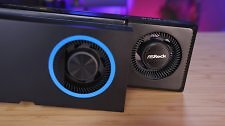
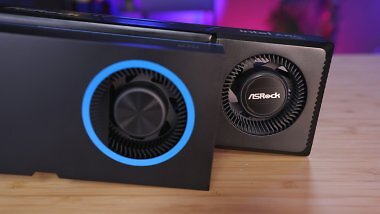
Our test subject uses a Direct Heat Exhaust design. This approach, also known as a "blower," features a single radial fan at the rear instead of multiple axial fans distributed across the entire card. A DHE cooler does not circulate the waste heat inside the PC case but instead forces it through a fin stack, at the end of which is the open slot bracket—the heat escapes from the computer for the most part. The dual-slot design is reminiscent of graphics cards from days gone by, such as the Radeon RX 5000 or GeForce GTX, though significantly simpler. With its matte black design and subtle gold accents, the Asrock card exudes a sophisticated charm.
Source: PC Games Hardware
Intel Arc B780 Simulation: OC Settings
Our test subject uses a Direct Heat Exhaust design. This approach, also known as a "blower," features a single radial fan at the rear instead of multiple axial fans distributed across the entire card. A DHE cooler does not circulate the waste heat inside the PC case but instead forces it through a fin stack, at the end of which is the open slot bracket—the heat escapes from the computer for the most part. The dual-slot design is reminiscent of graphics cards from days gone by, such as the Radeon RX 5000 or GeForce GTX, though significantly simpler. With its matte black design and subtle gold accents, the Asrock card exudes a sophisticated charm.
Power Supply and Power Consumption
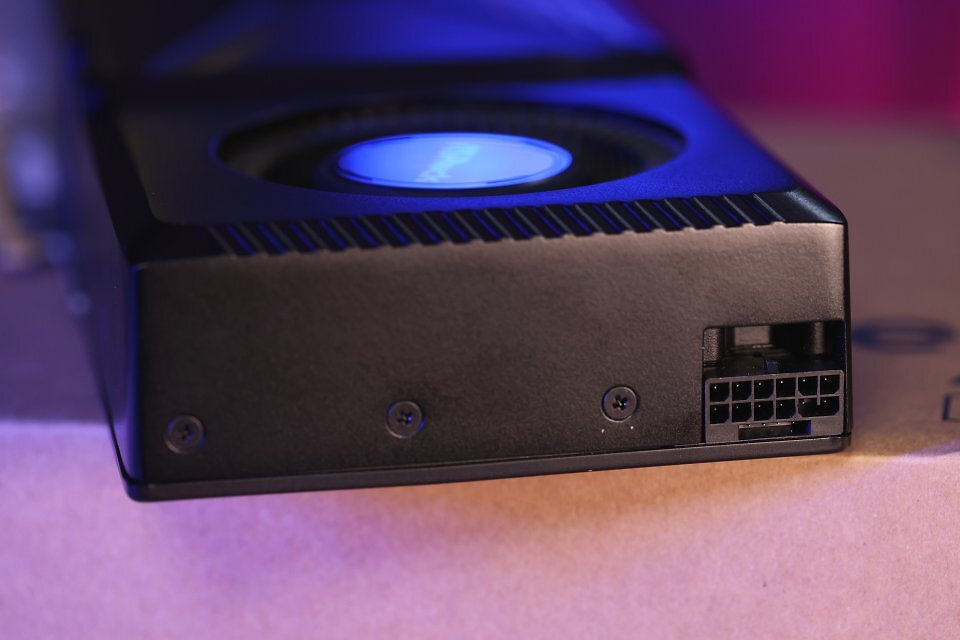
To deliver up to 330 watts, Asrock uses a 12V 2×6 connector instead of multiple traditional connectors. Competitor Sparkle has also opted for this new power delivery solution. As with the Intel reference card, the connector is positioned horizontally, allowing the cables to be neatly routed to the rear. The 12V-2×6 connector, like its predecessor 12VHPWR, continues to make headlines because compatible graphics cards—or rather, their power connectors—are prone to overheating and thus burning out. In the PCGH test lab, not a single graphics card equipped with this modern connector has burned out so far, and the Asrock Arc Pro B70 Creator showed no signs of becoming the next one to join that list.
 Source: PC Games Hardware
"Arc B780" DIY Build: Can We Beat the RTX 5070 and RX 9070 at 3.1 GHz? (8)
PCGH measures the power consumption of graphics cards using the Power Capture Analysis Tool. As always, the following table shows the maximum values for all graphics cards, without any throttling caused by the infrastructure. Those with good case ventilation, who only play in Full HD, or who prefer to use frame rate limits will experience both lower power consumption and lower noise levels. Let's now look at the values during idle, low load, and various workloads:
Source: PC Games Hardware
"Arc B780" DIY Build: Can We Beat the RTX 5070 and RX 9070 at 3.1 GHz? (8)
PCGH measures the power consumption of graphics cards using the Power Capture Analysis Tool. As always, the following table shows the maximum values for all graphics cards, without any throttling caused by the infrastructure. Those with good case ventilation, who only play in Full HD, or who prefer to use frame rate limits will experience both lower power consumption and lower noise levels. Let's now look at the values during idle, low load, and various workloads:
PCGH measures the power consumption of graphics cards using the Power Capture Analysis Tool. As always, the following table shows the maximum values for all graphics cards, without any throttling caused by the infrastructure. Those with good case ventilation, who only play in Full HD, or who prefer to use frame rate limits will experience both lower power consumption and lower noise levels. Let's now look at the values during idle, low load, and various workloads:
PCGH measures the power consumption of graphics cards using the Power Capture Analysis Tool. As always, the following table shows the maximum values for all graphics cards, without any throttling caused by the infrastructure. Those with good case ventilation, who only play in Full HD, or who prefer to use frame rate limits will experience both lower power consumption and lower noise levels. Let's now look at the values during idle, low load, and various workloads:
| Leistungsaufnahme | „Arc B780” | Arc Pro B70 | Arc Pro B60 | Arc B580 | RX 9060 XT 16GB | RTX 5060 Ti 16GB |
|---|---|---|---|---|---|---|
| Getestetes Modell | Asrock Creator MAX-OC | Intel-Referenz | Sparkle Blower | Intel-Referenz | Sapphire Pulse | Zotac Twin Edge |
| Leerlauf/Idle (UHD-Desktop) | 49 – 50 Watt* | 49 – 50 Watt* | 33 – 34 Watt* | 13 – 37 Watt | 6 – 7 Watt | 12 – 13 Watt |
| Dual-Display (UHD + FHD) | 50 – 51 Watt* | 50 – 51 Watt* | 34 – 35 Watt* | 20 – 37 Watt | 7,5 – 9 Watt | 14 – 15 Watt |
| Ultra-HD-Youtube-Video | 51 – 52 Watt* | 52 – 53 Watt* | 36 – 37 Watt* | 37 – 40 Watt | 16 – 18 Watt | 15 – 16 Watt |
| Gaming (Maximum) | 331 Watt | 235 Watt | 162 Watt | 197 Watt | 168 Watt | 184 Watt |
| Anno 117 (Full HD, Raster) | 217 Watt | 201 Watt | – | – | – | – |
| Anno 1800 (FHD, 4× MSAA) | 288 Watt | 230 Watt | 119 Watt | 175 Watt | 167 Watt | 175 Watt |
| Control (WQHD, RT) | 329 Watt | 233 Watt | 143 Watt | 185 Watt | 167 Watt | 166 Watt |
| CP2077 (Full HD, Raster) | 301 Watt | 233 Watt | 121 Watt | 147 Watt | 167 Watt | 180 Watt |
| Metro Exodus EE (WQHD, RT) | 330 Watt | 233 Watt | 153 Watt | 196 Watt | 167 Watt | 183 Watt |
| Full-HD-Gaming @ 60-Fps-Limit | 69 Watt | 72 Watt | 55 Watt | 62 Watt | 40 Watt | 37 Watt |
| Max. Energie über Slot (12V+3,3V) | 50 Watt | 64 Watt | 52 Watt | – | 40 Watt | 47 Watt |
| Blender Benchmark (Classroom) | 245 Watt | 231 Watt | – | – | – | – |
| PCGH VGA Tool (Furmark) | 331 Watt | 234 Watt | – | – | – | – |
Power consumption depends on the display, resolution, and refresh rate. The range is specified as 60 to 144 hertz (without VRR). *Without ASPM explicitly enabled.
While the idle readings now elicit only a shake of the head rather than sheer horror (see the PCGH review of the Intel Arc Pro B70 for full details), our focus turns to the load measurements. There, the expected results emerge: While the Intel reference card is consistently power-limited, our "Arc B780" is largely able to perform to its full potential and boost to its heart's content. Depending on the load, gaming consumes between 217 and 331 watts. The former is an exception in the form of Anno 117. The game is at odds with Arc GPUs—or vice versa—so that load, frame rates, and power consumption are low. When everything runs as intended, our overclocked graphics card typically operates in the 300-watt range (a level first reached by the 2020 high-end Radeon RX 6800 XT and GeForce RTX 3080).
Energy efficiency
Power is work per unit of time—something we've known since physics class, if not before. Since we've determined both the frame rates (FPS) and power consumption (watts), we can compare them to calculate energy efficiency. To do this, we've created a benchmark for you that factors in the performance index alongside power consumption. Since both metrics are understood as averages derived from numerous measurements, the analysis is sufficiently precise. For maximum accuracy, we performed the calculation separately for both rasterization and ray tracing. Let's see how the "Arc B780" stacks up in comparison, starting with rasterization:
The Intel Arc Pro B70 operates within the optimal range for its architecture at 230 watts; the Arc B580 is just as efficient. Overclocking with increased voltage always results in lower efficiency—as is the case with our "Arc B780." Across all rasterization benchmarks, the graphics card consumes an average of 295 watts. While this results in about 17 percent more performance, efficiency drops by 11 percent due to the 31 percent higher power consumption. Let's see how it performs in ray tracing:
No surprises here: the "Arc B780" also loses a significant amount of efficiency when it comes to ray tracing. This is due to the significantly higher voltage required to break the 3-GHz barrier. If it were possible to establish a reliable voltage/frequency curve, performance could be improved. A water cooler would also help reduce component leakage currents. On the next page, we'll wrap up our review of the "Arc B780".